This app visualizes permutations in several modes and keeps live Inversions and Parity stats. Arrows always start at the top label (the value) and land at the tile below (its position). Where arrow segments cross you’ll see cross dots (if enabled) – these crossings correspond to inversions.
Modes
-
single — One permutation of 1…n. Use
Random permutation and
Reset.
• Crosses toggles inversion dots. Resolve Multicross gently spreads columns to separate multi-crossings. -
double — Two permutations share the same 1…n:
blue for the first,
green for the second.
• Combo composes them; the stats panel shows inversions & parity for each and for the composition.
• Animate Combo shows how the combined permutation moves the tiles.
• Crosses shows crossings separately for the blue and green bands.
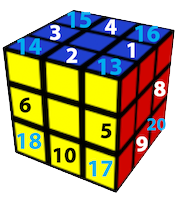
• Resolve Multicross spreads columns to simplify tangled crossings. - Rubik’s (corners) — n = 8. Visualises permutation of corner pieces under quarter turns U D L R F B.
- Rubik’s (edges) — n = 12. Same idea for edge pieces.
-
15-puzzle — Classic 4×4 puzzle with blank “16”.
• Randomize performs a solvable random walk; Roundtrip = walk + guided return.
• Solve uses IDA*; Slow Motion adjusts animation speed live.
• Show 16 toggles blank visibility; Hide tiles hides numbers.
• Permutation view switches between 4×4 and 1×16 layouts, animated.
• Arrow keys move the blank: ↑ ↓ ← →.
Stats show inversions, blank row from bottom, step count, solvability. -
swap — Interactive swapping demo for a permutation of 1…n.
• Click two tiles to select; arrowheads turn gold.
• Animate Swap swaps the selected tiles with easing.
• Random Swap picks two tiles; • Random Permute animates to a random permutation.
• Minimum uses a “place-each-value” algorithm; • Bubble uses adjacent swaps.
• Crosses shows inversion dots; Inner and Outer filter crossings relative to selected tiles.
• Resolve Multicross spreads columns visually. The 54216378 button is a preset for n=8.
Global controls
- n — Adjustable in single, double, and swap. Fixed in Rubik’s and 15-puzzle.
- Theme — Switch among colour palettes.
- Crosses — Show/hide inversion dots.
- Resolve Multicross — Spreads dense crossings.
- Title and stats update automatically.
Keyboard & tips
- Rubik’s: U D L R F B for face turns; x y z for reorientation.
- 15-puzzle: ↑ ↓ ← → to move tiles when legal.
- Help: Click outside this panel or press Esc.
© Burkard Polster, 3 December 2025.
Licensed under
CC BY-NC-SA 4.0
.